In this guide
Make your first coloring book with 10 free signup credits in CPages. Choose three coloring pages and a color cover for 8 credits, then download the whole book as one watermark-free PDF.
Follow the dinosaur walkthrough below, from choosing a theme to downloading the finished book. The screenshots show the same book at each step.
Open the four-page example PDF. It contains a color cover and three coloring pages, each on a portrait US Letter page (8.5 × 11 inches).
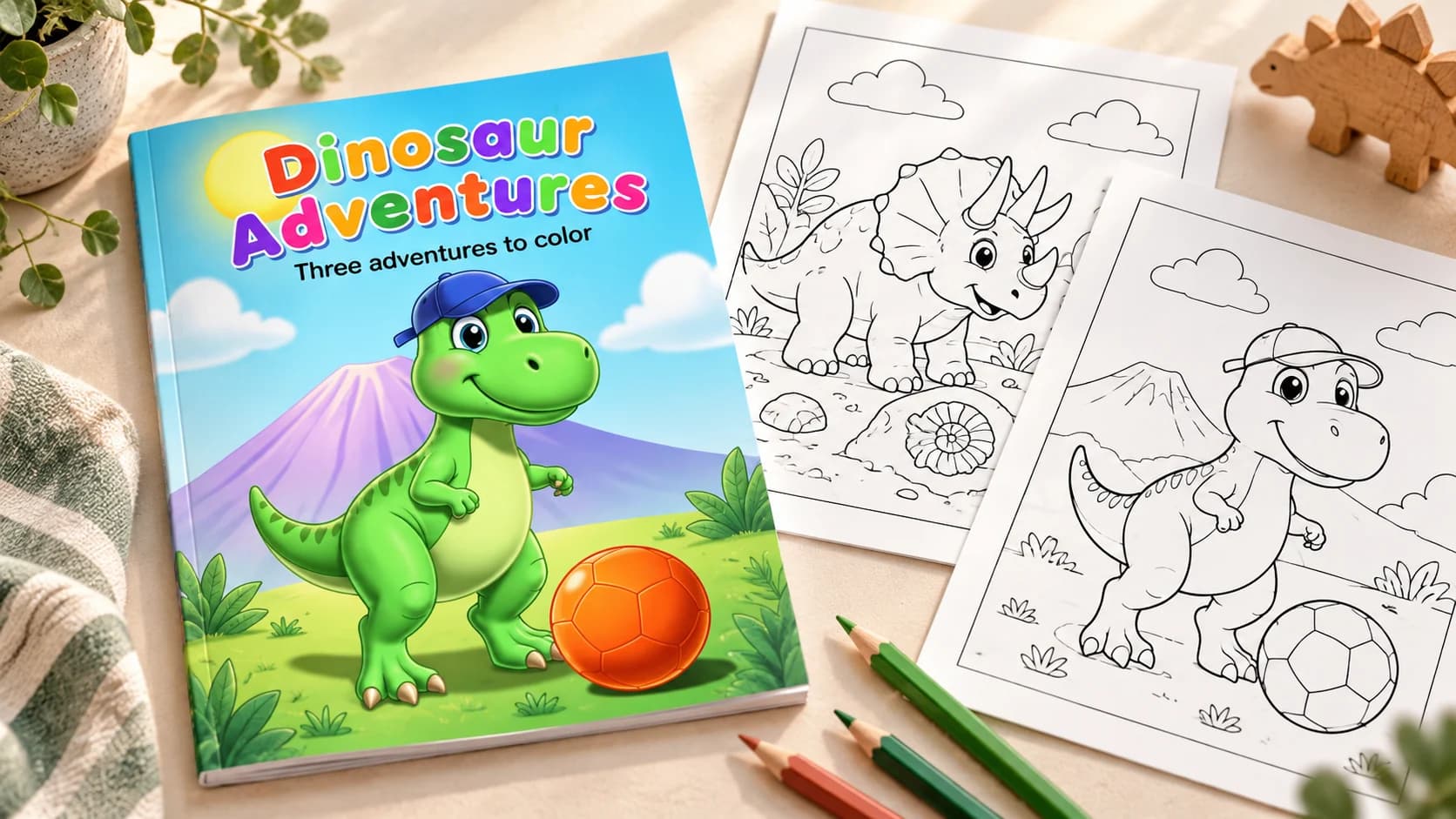
What the free credits cover
The written plan includes a title, a cover scene, and a description for each inside page. Edit the plan for free, then use credits when you generate the illustrations.
| Item | Credits |
|---|---|
| New-account signup allowance | 10 |
| Written book plan | 0 |
| Three inside pages | 6 |
| One color cover | 2 |
| Complete PDF download | 0 extra |
| Total for this book | 8 |
Starting with all 10 signup credits leaves 2 after this book, enough for one redraw. Extra pages and redraws use more credits, and the Free plan is for personal use. If you have already spent some credits, check your balance and the current plans before generating.
1. Choose a theme and three inside pages
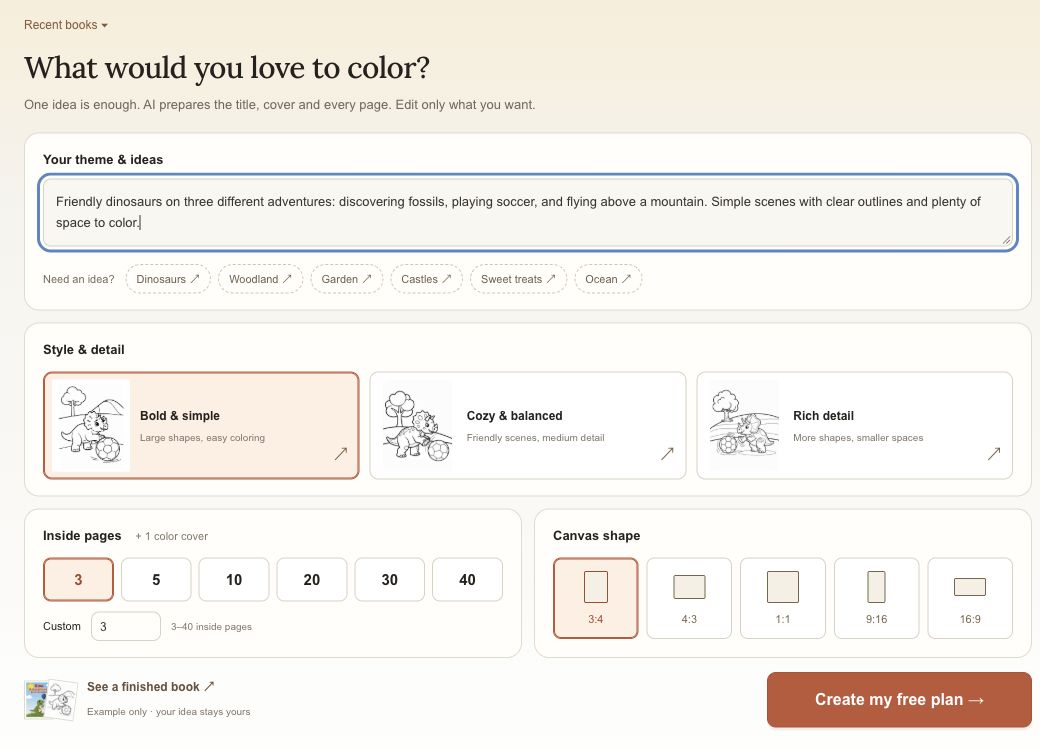
Open the AI coloring book maker and select “Plan my coloring book for free.” Enter your idea in “Your theme & ideas.” This was our prompt:
Friendly dinosaurs on three different adventures: discovering fossils, playing soccer, and flying above a mountain. Simple scenes with clear outlines and plenty of space to color.
We chose “Bold & simple,” 3 inside pages, and a 3:4 canvas. The three pages are the black-and-white illustrations. The color cover adds a fourth page to the PDF.
Select “Create my free plan.” If you are signed out, sign in or create an account when prompted. Check that your theme is still there after signing in, then press the button again.
2. Review the plan before generating
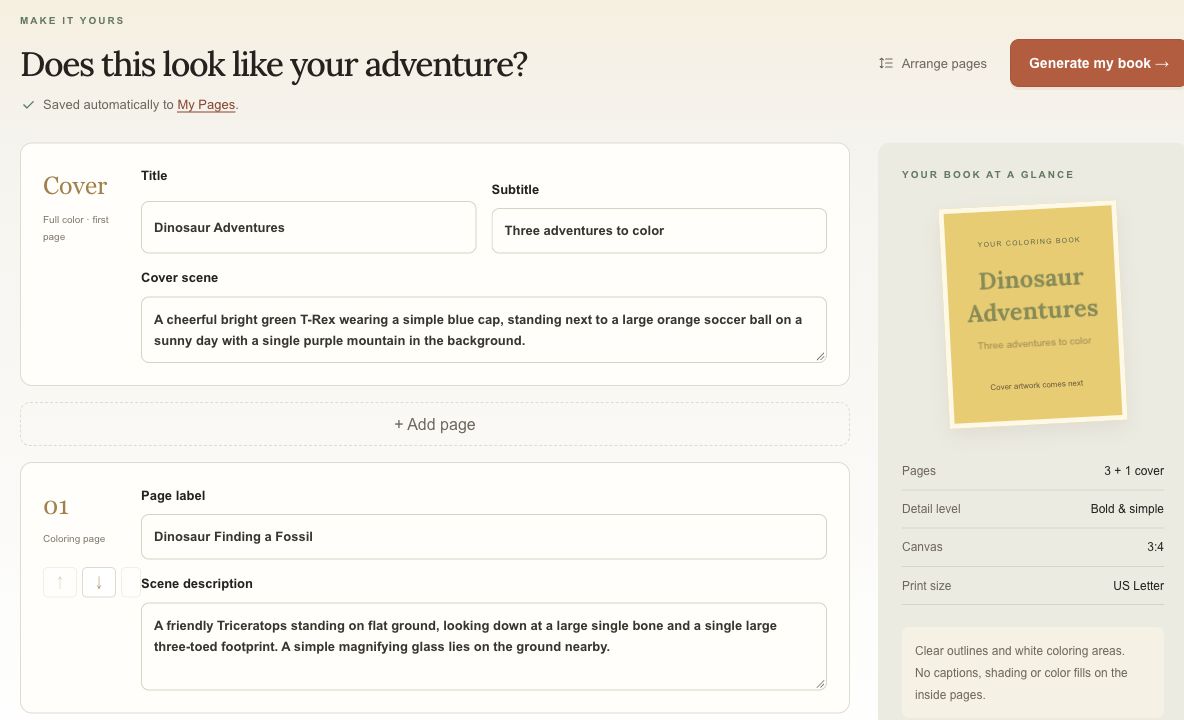
Our plan proposed a fossil scene, a soccer scene, and a flying dinosaur. We changed the title to “Dinosaur Adventures” and the subtitle to “Three adventures to color.”
Edit any scene that sounds repetitive or too complicated. “Arrange pages” lets you change the order. Check the saved status before leaving the page. At this stage, the book shape on the right is a title preview; the cover illustration hasn't been generated yet.
3. Check the price and generate
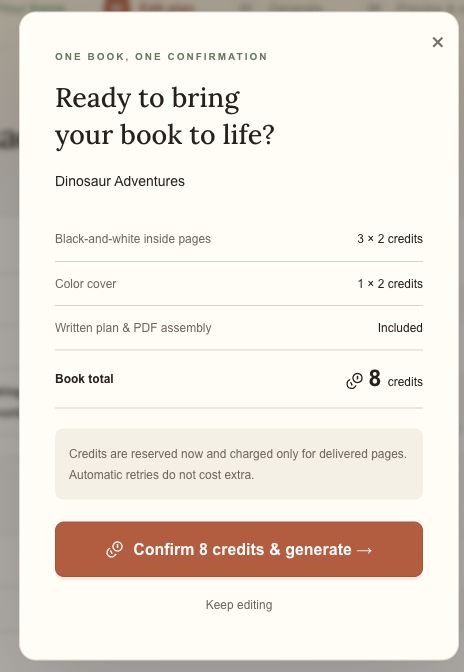
Choose “Generate my book.” The confirmation separates the inside pages from the cover. Our total was 8 credits. Check your own total before confirming, especially if you changed the number of pages.
If a page does not finish, the completed illustrations stay in the book. Open it to check progress and the available retry options. Automatic retries cost no extra; a new redraw shows its cost before confirmation.
4. Check the finished pages
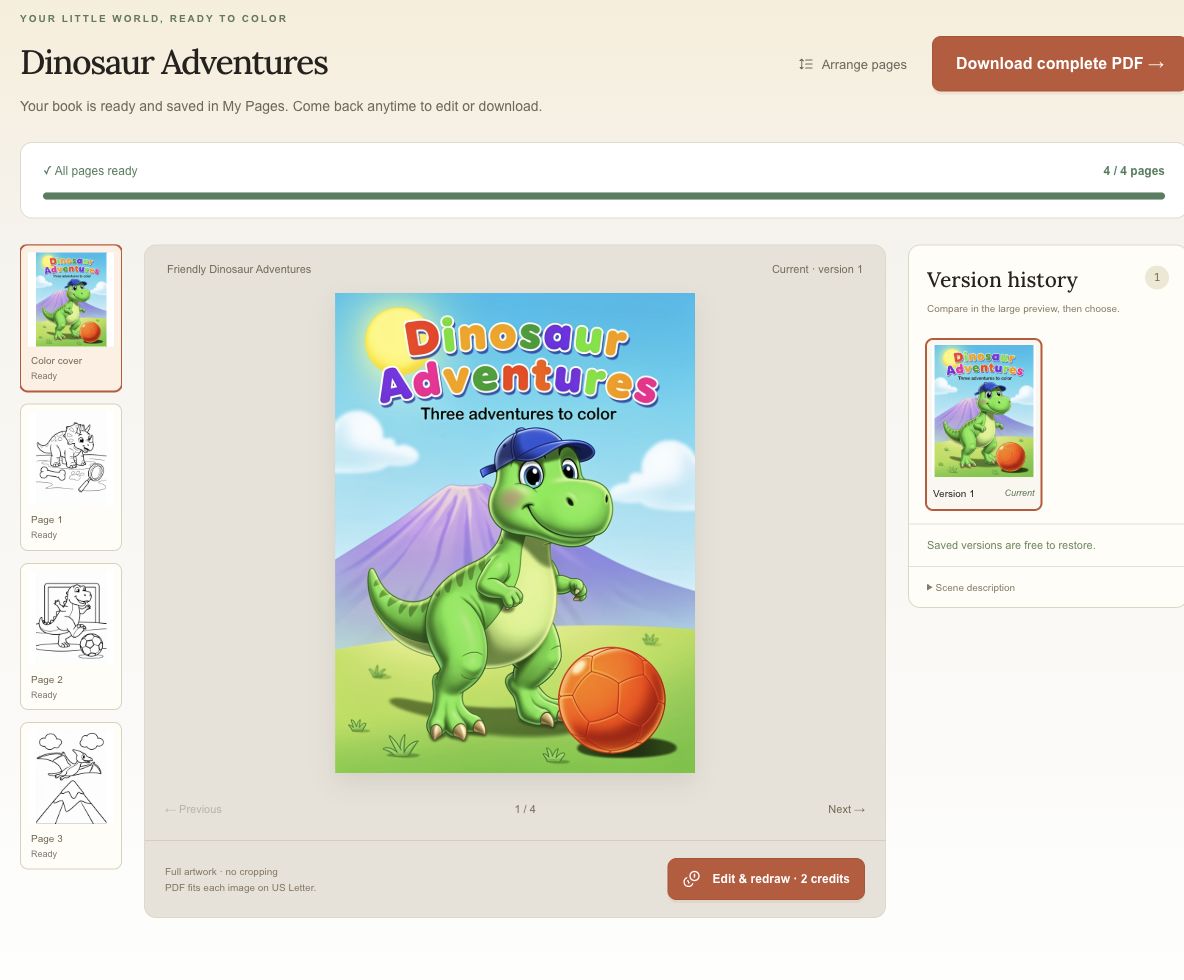
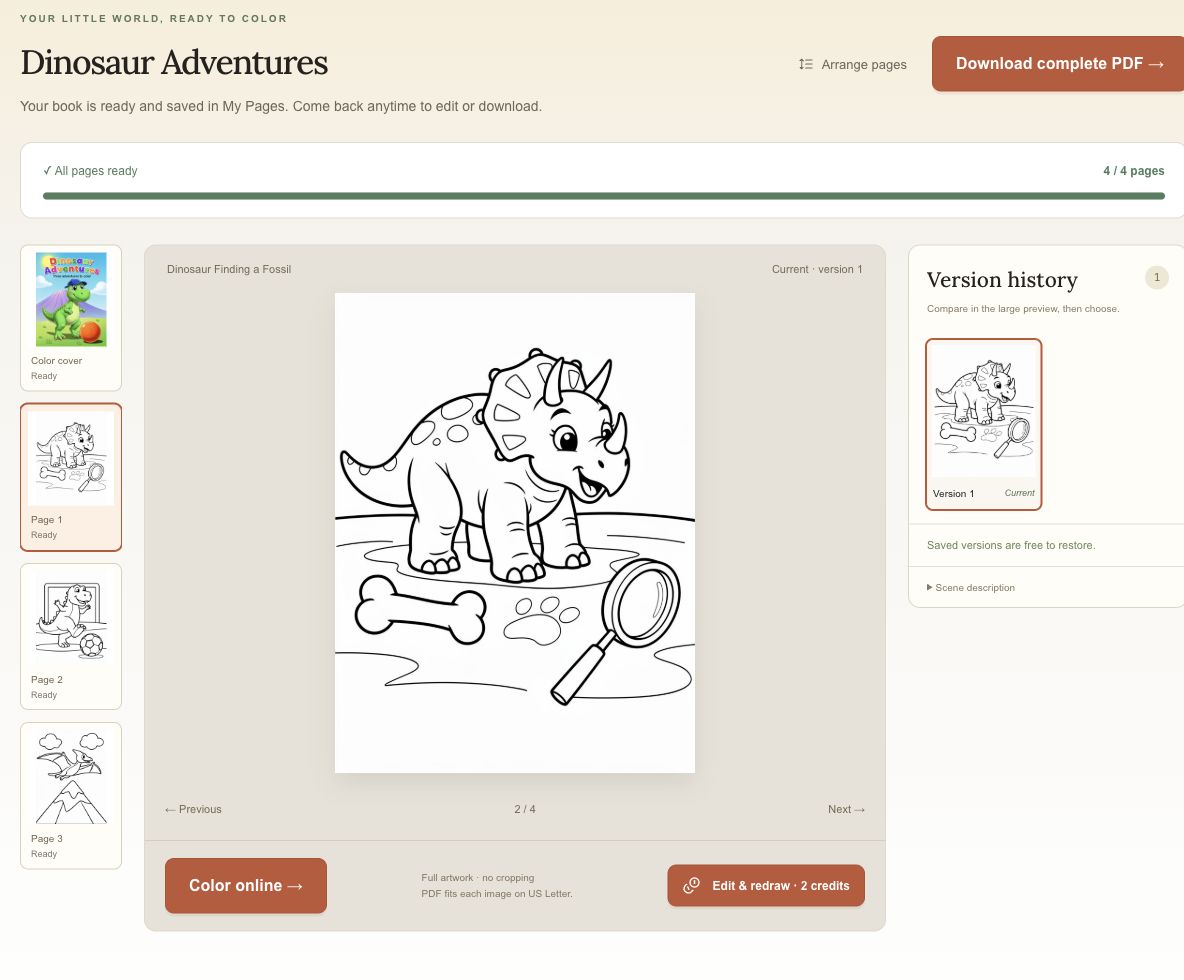
Open each page in the book preview before downloading. Look for outlines that are hard to follow or small spaces that will be awkward to color. You can edit a page's description and redraw that page while keeping the others. Each new redraw uses additional credits.
5. Download the complete PDF
Select “Download complete PDF” beside the book title. CPages puts the cover first, followed by the inside pages in book order. You do not need Canva or a separate PDF merger for this download.
Our Dinosaur Adventures PDF has four portrait US Letter pages, each 8.5 × 11 inches. CPages fits each image inside the margins without stretching or cropping it. Wider artwork leaves more white space.
Open the file before printing. If you are using a different paper size, choose your printer's fit-to-page setting and print one sheet first. You can print only the black-and-white inside pages to save color ink. CPages supplies the digital file; you print it at home or through a print shop.
For paper size, scaling, and which pages to select, follow the A4 and Letter printing guide.
Your saved book stays in My Pages for later edits and downloads.
What changes for a longer book?
CPages supports 3 to 40 inside pages plus a color cover. At 2 credits per illustration, a book with 30 inside pages would cost 62 credits including its cover and download as a 31-page PDF. This exceeds the 10-credit signup allowance.
For a longer book, spend more time on the written plan while edits are free:
- Read every scene description. Give each page a different activity or setting, and check for repeated objects or similar compositions.
- Arrange the scenes into the sequence you want before generating the illustrations.
- Set aside credits for revisions. For example, choosing to redraw two illustrations would add 4 credits to the 62-credit book. Check the total before each redraw.
- Review every finished picture, keeping the pages you like and revising those that need work.
- Open the final PDF to confirm the cover, page order, and total count. Thirty inside pages plus the cover should give you 31 document pages.
Can I sell the book?
Yes. Pro and Business include commercial use for eligible books created while your subscription is active, including books you prepare for Etsy or Amazon KDP. The Free plan is for personal use. See the plan comparison and terms for details.
CPages does not provide KDP-ready formatting. A cover-first US Letter PDF does not replace the separate interior and cover files a publishing workflow may require. For Amazon KDP, check its content guidelines and paperback file requirements before preparing your files.
Before you make another book
Starting with three pages leaves room in the signup allowance for one redraw. Once you have seen the result, you can plan a longer book or try a different level of detail.
For an activity you can print straight away, the free printable coloring pages have PNG and PDF downloads without sign-in. To start from a picture you already have, use the photo-to-coloring-page tool.
Questions before you start
Can I make an AI coloring book without paying?
Yes, if you have enough of your signup allowance left. A new account receives 10 credits, and three inside pages plus a color cover cost 8. Extra pages and redraws use more credits.
Do I need to sign up?
Yes, to generate a book. The separate Free Coloring Pages collection has curated PNG and PDF downloads without sign-in.
Will the PDF have a watermark?
CPages downloads are watermark-free on the Free plan and paid plans. The coloring book downloads as one PDF.
Do I need another tool to combine the pages into a PDF?
No. CPages combines the generated cover and inside pages into one US Letter PDF. Download complete PDF includes them in book order without an extra credit charge.